Bakso Malang Anomalies Controls Guide (September 2026)
To survive your night shift at the Warung Bakso in Bakso Malang Anomalies, you need to master essential controls: WASD for movement, E to interact, Q for Third Eye anomaly detection, and F for night vision on CCTV. This Indonesian horror experience challenges you to serve customers while identifying supernatural threats using these core mechanics. Our comprehensive guide covers all PC and mobile controls, advanced Third Eye techniques, and pro strategies to help you survive all 40+ anomaly encounters and unlock all 9 endings.
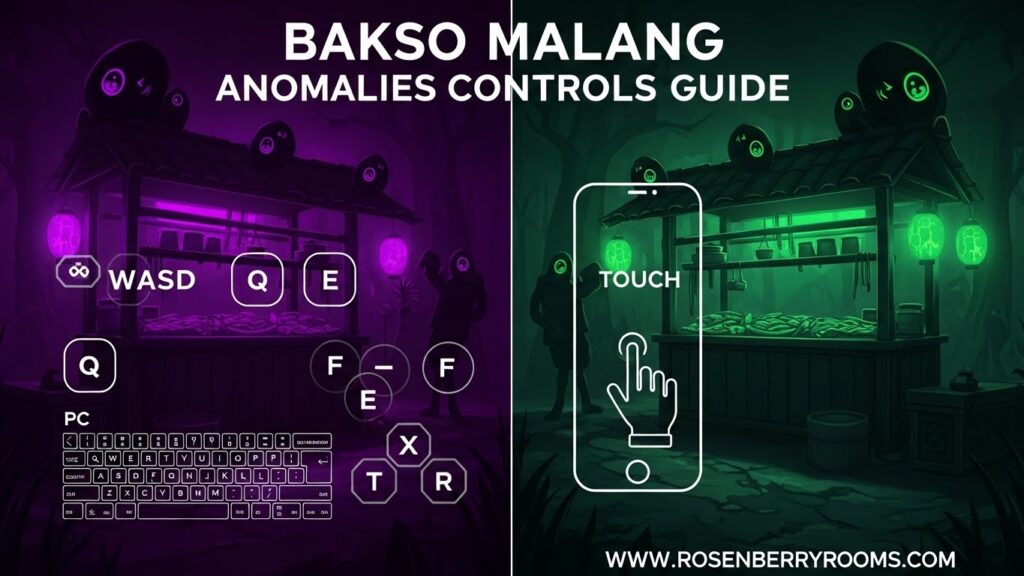
Quick Reference: Essential Controls
| Action | PC Control | Mobile Control | Purpose |
|---|---|---|---|
| Movement | W, A, S, D | Dynamic Joystick | Navigate your stall |
| Interact/Pick Up | E | Hand Icon | Serve customers, grab items |
| Third Eye | Q (Hold) | Eye Icon (Hold) | Detect anomalies |
| Night Vision | F (CCTV only) | Moon Icon (CCTV) | See in dark camera feeds |
| Sprint | Left Shift | Running Icon | Move quickly |
| Switch Camera | Click Monitor | Tap Monitor | Cycle through CCTV feeds |
| Close Shutter | Click Red Lever | Tap Red Lever | Block threats |
Complete PC Controls Guide 2026
Movement and Navigation
On PC, your left hand manages movement while your right hand handles camera control and precision interactions. The WASD keys provide fluid movement around your Bakso stall, allowing you to quickly respond to customer demands and potential threats.
Contents
Advanced Movement Tips:
- Use Left Shift to sprint when the Inspector arrives or during emergencies
- Combine sprint with quick direction changes for evasive maneuvers
- Practice smooth transitions between the ingredient stations for efficient serving
Core Interaction Controls
The E key serves as your primary interaction button for all stall operations:
- Grab bowls from the stack
- Add noodles and meatballs to orders
- Interact with the broth pot
- Serve completed orders at the counter
- Open and close the security shutter
Pro Tip: Position yourself optimally at each station to minimize movement time between interactions. The most efficient servers keep their cursor centered and use quick E taps rather than holding the key.
Third Eye Mechanics (Q Key)
The Third Eye (Q) is your supernatural detection tool and the most critical control in Bakso Malang Anomalies. Unlike similar games, this Roblox experience uses the Third Eye instead of CCTV as your primary anomaly detection method.
Safe Third Eye Usage:
- Quick taps (under 2 seconds) to check suspicious customers
- Short bursts during high-risk encounters
- Immediate release after verification
- Use in combination with CCTV for comprehensive scanning
Dangerous Usage Patterns:
- Holding Q for extended periods fills the hidden green meter
- Continuous usage throughout your shift
- Ignoring visual distortion warnings
- Using Third Eye during every customer interaction
Critical Warning: According to community research, overusing the Third Eye can trigger specific endings or unlock the secret “Jin World” ending by filling the supernatural influence meter.
CCTV and Security System
While Third Eye replaces CCTV as your main detection tool, the camera system remains essential for monitoring your stall perimeter:
F Key – Night Vision: Activates night vision mode while viewing CCTV feeds, crucial for spotting anomalies in dark areas of your stall exterior.
Mouse Click – Camera Switching: Direct clicking on monitor screens cycles through different camera angles. Master the camera layout to quickly check all vulnerable areas.
Strategic Camera Usage:
- Monitor the customer queue before they reach your window
- Check side entrances for unexpected anomalies
- Watch for Inspector arrival patterns
- Verify anomaly departure after rejection
Shutter Control and Emergency Procedures
The red lever beside your serving window controls the security shutter – your last line of defense against aggressive anomalies.
Shutter Operation:
- Click the red lever to quickly close the shutter
- Keep it closed during high-threat situations
- Reopen only when you’ve verified safety
- Practice quick shutter-close reactions for survival
Complete Mobile Controls Guide
Touch Interface Overview
The mobile version features a custom Heads-Up Display (HUD) designed to provide all essential controls within thumb reach. The interface adapts to different screen sizes while maintaining accessibility.
Movement System
Dynamic Joystick: Located in the bottom-left corner, this floating joystick provides 360-degree movement. The interface automatically adjusts sensitivity based on your device, but you can modify this in Roblox settings.
Mobile Movement Tips:
- Use your left thumb for smooth, circular movements
- Practice quick direction changes for anomaly evasion
- Combine with sprint button for emergency escapes
- Keep joystick centered for maximum control range
Interaction Controls
Hand Icon: Appears contextually when you’re near interactive objects. The icon changes color to indicate interaction availability:
- White: Standard interaction available
- Yellow: Priority interaction (customer waiting)
- Red: Emergency interaction (anomaly threat)
Third Eye Mobile Controls
Eye Icon: Positioned on the right side of the screen for easy thumb access. The mobile version includes haptic feedback warnings when you’re approaching dangerous usage levels.
Mobile Third Eye Strategy:
- Use quick taps instead of holding
- Monitor the visual distortion indicators
- Combine with camera system for comprehensive coverage
- Practice one-handed operation during serving
Camera and Security Controls
Monitor Interaction: Tap directly on the CCTV monitor to cycle through camera feeds. The mobile version includes pinch-to-zoom functionality for detailed examination.
Night Vision Moon Icon: Only appears when viewing camera feeds, activating enhanced visibility in dark conditions.
Shutter Control: Tap the red lever handle for immediate shutter operation. Mobile players benefit from larger touch targets compared to PC clicking.
Advanced Control Strategies
Multi-Tasking Techniques
Mastering Bakso Malang Anomalies requires simultaneous control usage across multiple systems:
Serving While Scanning:
- Prepare orders with your left hand (movement/interaction)
- Keep right hand ready for Third Eye activation
- Use peripheral vision to monitor CCTV feeds
- Practice quick transitions between serving and scanning
Emergency Response Patterns:
- Detect anomaly with Third Eye (Q/Eye)
- Immediately close shutter (Click/Tap lever)
- Verify anomaly departure via CCTV
- Resume serving when safe
Sanity Management Through Controls
Your sanity meter is affected by Third Eye usage, creating a risk-reward system:
Sanity Preservation Techniques:
- Limit Third Eye use to 3-4 seconds maximum per activation
- Allow 10-15 seconds between Third Eye uses
- Watch for visual distortion warnings (screen warping, color shifts)
- Use CCTV cameras as alternative detection methods
Sanity Recovery:
- Normal serving activities slowly restore sanity
- Closing the shutter provides temporary protection
- Successful anomaly rejections give minor sanity boosts
- Avoid continuous Third Eye usage during peak anomaly activity
Platform-Specific Optimizations
PC Performance Settings
For optimal control responsiveness on PC:
Recommended Settings:
- Graphics Quality: Medium (balances visibility and performance)
- Mouse Sensitivity: 15-20 (adjust for your preference)
- Camera Shake: Disabled (reduces disorientation during anomalies)
- Spatial Audio: Enabled (helps detect approaching threats)
Control Customization:
- Rebind Third Eye to more accessible key if needed
- Set up additional mouse buttons for camera switching
- Configure sprint toggle for longer shifts
- Adjust field of view for better peripheral vision
Mobile Performance Optimization
Device Recommendations:
- Minimum 4GB RAM for smooth performance
- Screen size 5.5″+ for optimal control visibility
- Ensure at least 2GB free storage for smooth operation
Mobile Settings:
- Graphics Quality: Low to Medium (prioritize frame rate)
- Enable haptic feedback for Third Eye warnings
- Disable unnecessary background apps
- Use landscape mode for best control layout
Common Control Mistakes and Solutions
Beginner Control Errors
Mistake 1: Overusing Third Eye
- Problem: Holding Q/Eye too long, causing rapid sanity drain
- Solution: Practice quick taps (1-2 seconds maximum)
- Recovery: Close shutter and wait 30 seconds for partial sanity restoration
Mistake 2: Inefficient Movement Patterns
- Problem: Wasting time moving between stations
- Solution: Plan optimal routes and practice smooth transitions
- Pro Tip: Memorize ingredient locations for automatic movement
Mistake 3: Ignoring Camera System
- Problem: Relying solely on Third Eye for detection
- Solution: Use CCTV for perimeter monitoring, Third Eye for close-range verification
- Strategy: Check cameras between every 2-3 customers
Advanced Control Challenges
Challenge 1: Multiple Anomaly Encounters
- Strategy: Prioritize closest threats, use shutter for protection
- Control Combination: Third Eye + Shutter + Camera cycling
- Timing: Close shutter before engaging multiple anomalies
Challenge 2: Inspector Visits
- Preparation: Ensure all serving areas stocked
- Control Focus: Sprint + Quick serving + Minimal Third Eye usage
- Success Rate: Higher sanity during Inspector visits
Endings and Control Usage
Perfect Shift Ending Requirements
Achieving the best ending requires flawless control execution:
Control Metrics for Perfect Shift:
- Third Eye usage: Under 30 seconds total
- Customer service: 100% accuracy
- Anomaly detection: 100% success rate
- Rule compliance: Zero violations
- Shutter usage: Optimal timing (not overused)
Ending-Specific Control Strategies
Millionaire Ending:
- Focus on serving speed over anomaly detection
- Minimal Third Eye usage to maintain serving rhythm
- Quick interactions for maximum customer throughput
Jin World (Secret) Ending:
- Deliberate Third Eye overuse to fill green meter
- Extended Q/Eye holds (5+ seconds)
- Multiple anomaly encounters required
- Specific interaction sequences with certain anomalies
Community Resources and Official Channels
Official Game Information
Stay updated with the latest control changes and features:
- Roblox Game Page: Search “Bakso Malang Anomalies” for official updates
- Developer Social Media: Follow for patch notes and new anomaly announcements
- Official Discord: Join for real-time strategy discussions and control tips
Community Learning Resources
YouTube Walkthroughs:
- Full gameplay demonstrations showing advanced control techniques
- Speedrun strategies highlighting optimal control usage
- Anomaly identification tutorials using Third Eye mechanics
Reddit Communities:
- r/Roblox for general Bakso Malang discussions
- r/horrorroblox for specific strategy sharing
- Community-compiled control optimization guides
Fan Wikis and Databases:
- Comprehensive anomaly identification guides
- Control customization recommendations
- Ending requirement breakdowns with control metrics
Frequently Asked Questions
How do I fix unresponsive controls on mobile?
Ensure your device has sufficient storage space and RAM. Close background apps and restart Roblox. If issues persist, check for game updates as the developers release patches almost daily.
What’s the best way to use the Third Eye without losing sanity?
Use quick taps of 1-2 seconds maximum. Wait 10-15 seconds between uses. Watch for visual distortion warnings and release immediately when they appear. Combine Third Eye with CCTV cameras for comprehensive coverage.
Can I customize controls on PC?
Yes! Access Roblox settings to rebind keys. Many players move Third Eye to mouse buttons for easier access during serving. Adjust mouse sensitivity to your preference for optimal camera control.
Why does my screen warp when using Third Eye?
Visual distortion indicates approaching sanity loss from Third Eye overuse. Release the key immediately and allow time for recovery. This is a game mechanic, not a bug.
How do I handle multiple anomalies at once?
Close your shutter immediately for protection. Use CCTV to monitor their positions. Wait for some to leave before reopening. Prioritize the closest threats when you must engage.
What’s the difference between Bakso Malang and Scary Shawarma controls?
Bakso Malang uses Third Eye (Q) as primary detection instead of CCTV cameras. The game features 40+ unique anomalies vs Shawarma’s smaller roster. Controls are similar but with Indonesian horror elements and daily updates.
Pro Tips for Control Mastery
Speed Optimization Techniques
Serving Efficiency:
- Memorize ingredient positions for automatic movement
- Practice smooth transitions between stations
- Use sprint strategically during Inspector visits
- Minimize unnecessary Third Eye usage during peak hours
Anomaly Detection Speed:
- Develop quick Third Eye tap reflexes
- Learn anomaly visual patterns for faster identification
- Use camera system to pre-screen customers
- Trust your instincts – if something feels off, check it
Advanced Control Combinations
Emergency Protocol:
- Third Eye (Q) → Detect threat
- Shutter Close (Click/Tap) → Protect yourself
- Camera Cycle → Monitor threat movement
- Wait for safe conditions
- Resume serving when clear
High-Efficiency Serving:
- Grab bowl (E)
- Add ingredients (E at each station)
- Quick Third Eye check (Q tap)
- Add broth (E)
- Final anomaly verification (Q tap)
- Serve (E at counter)
Conclusion
Mastering Bakso Malang Anomalies controls is essential for survival and unlocking all endings. The game’s unique blend of Indonesian horror, supernatural detection mechanics, and time-pressure serving creates an experience that rewards precise control execution and strategic thinking.
Remember that the game updates almost daily with new anomalies and mechanics, so stay connected with the community for the latest control strategies. Practice the techniques outlined in this guide, and you’ll be well-equipped to handle whatever supernatural threats the night shift throws at your Warung Bakso.
Whether you’re aiming for the Perfect Shift ending, trying to unlock the secret Jin World, or just trying to survive your first night, precise control usage is your key to success. Keep practicing, stay alert, and may your Third Eye stay sharp!
Bookmark this guide for regular updates as Bakso Malang Anomalies continues to evolve with new content and mechanics. The community is constantly discovering new strategies, and we’ll keep this guide current with the latest control optimizations and survival techniques.