
12 Best MIDI Keyboards for Producers (September 2026) Reviewed
Finding the best MIDI keyboards for producers comes down to the way you actually make tracks. A controller turns note entry, drum programming, automation, and sound browsing into physical actions, so a melody or beat does not have to begin as a mouse click in the piano roll.
A MIDI keyboard does not make sound by itself. It sends note, velocity, pitch, modulation, and control data over USB or MIDI to a DAW, software instrument, or compatible hardware, which is why the right keyboard controller can make a studio setup feel quicker without replacing the computer at its center.
Contents
I would start with three decisions: whether you need 25, 49, or 61 keys; whether your work centers on a particular DAW; and whether pads, faders, or external MIDI connections matter more than a piano-style playing surface. This 2026 guide compares 12 verified controllers for beatmaking, composition, finger drumming, and live-oriented production without treating one layout as right for every producer.
Top 3 Picks for Best MIDI Keyboards for Producers (September 2026)

Novation Launchkey 49 MK4
- 49 semi-weighted keys
- 16 polyphonic-aftertouch pads
- 9 faders
- Broad DAW support

As an Amazon Associate we earn from qualifying purchases. CERTAIN CONTENT THAT APPEARS ON THIS SITE COMES FROM AMAZON. THIS CONTENT IS PROVIDED 'AS IS' AND IS SUBJECT TO CHANGE OR REMOVAL AT ANY TIME.
The Novation Launchkey 49 MK4 is the broadest recommendation here because its 49 semi-weighted keys, 16 FSR pads with polyphonic aftertouch, nine faders, and stated support for major DAWs serve more than one production style. It is the pick I would make for a producer who wants a single desk controller for chords, drums, clips, and mixer moves.
The Arturia MiniLab 3 makes more sense when desk space and travel matter, while the Akai Professional MPK Mini IV puts MPC-style pads, knobs, a display, and mapped software control into a lightweight 25-key format. Neither mini-key option replaces a 49-key board for two-handed arranging, but both are practical starting points for laptop production.
Specialist workflows deserve specialist picks. FL Studio users should look first at the FLkey 61, Ableton clip performers at the APC Key 25 MK2, modular users at the MPK Mini Plus, and expressive players at the KORG Keystage 49 or Native Instruments S49 MK3.
Best MIDI Keyboards for Producers in 2026
| Product | Features | |
|---|---|---|
| Novation Launchkey 49 MK4 |
|
Check Latest Price |
 Arturia MiniLab 3 Arturia MiniLab 3 |
|
Check Latest Price |
| Akai MPK Mini IV |
|
Check Latest Price |
 Novation FLkey 61 Novation FLkey 61 |
|
Check Latest Price |
 Akai MPK Mini Plus Akai MPK Mini Plus |
|
Check Latest Price |
 Arturia KeyLab Essential 49 mk3 Arturia KeyLab Essential 49 mk3 |
|
Check Latest Price |
 Akai APC Key 25 MK2 Akai APC Key 25 MK2 |
|
Check Latest Price |
 KORG Keystage 49 KORG Keystage 49 |
|
Check Latest Price |
 Native Instruments S49 MK3 Native Instruments S49 MK3 |
|
Check Latest Price |
 Arturia MicroLab Mk3 Arturia MicroLab Mk3 |
|
Check Latest Price |
 RockJam RJMK25 RockJam RJMK25 |
|
Check Latest Price |
 Donner DMK 25 Pro Donner DMK 25 Pro |
|
Check Latest Price |
We earn from qualifying purchases. CERTAIN CONTENT THAT APPEARS ON THIS SITE COMES FROM AMAZON. THIS CONTENT IS PROVIDED 'AS IS' AND IS SUBJECT TO CHANGE OR REMOVAL AT ANY TIME.
Key count and control density are the fast way to narrow this list. The 25-key models travel well and suit bass lines, beats, and short melodies; 49 keys give a more comfortable writing range; the 61-key FLkey is the roomier option for producers who play fuller chord parts.
Ratings here are useful signals, not a substitute for matching the keyboard to your DAW and hands. Mini keys, full-size keys, semi-weighted action, pads, MIDI DIN, CV/Gate, and bundled software all affect daily workflow more than a single headline score.
1. Novation Launchkey 49 MK4 is the best all-round controller for multi-DAW producers
Novation Launchkey 49 MK4 USB MIDI Keyboard Controller
49 semi-weighted keys
16 FSR pads
9 faders
Major DAW support
Pros
- 49 semi-weighted keys
- 16 polyphonic-aftertouch pads
- Major DAW support
- NKS-ready
Cons
- Heavier than mini controllers
- 49 keys may not suit full piano parts
The Launchkey 49 MK4 is the balanced choice when a production keyboard needs to do more than enter notes. Its 49 waterfall-style semi-weighted keys leave room for two-handed chords, while the 16 FSR pads, eight endless encoders, and nine faders give beats, clips, and mixer functions a physical home.
Its stated DAW coverage includes Ableton Live, Logic, Cubase, Reason, Reaper, FL Studio, and Ardour, so I would favor it over a DAW-specific model when projects move between programs or collaborators use different software. Scale mode, chord triggers, and the arpeggiator also make it approachable when theory is still catching up with musical ideas.
The 49-key span gives most producers enough writing room
Forty-nine keys are a sensible middle ground for bass parts, melodies, and chord progressions without the desk footprint of a 61- or 88-key unit. The semi-weighted action is a better fit for producers who want a more piano-like response than slim mini keys provide.
The control layout supports sessions that need hands-on mixing
Nine faders and eight endless rotary encoders are useful when balancing tracks or shaping instruments without reaching for the mouse. Its NKS readiness adds another reason to shortlist it if Native Instruments software is already part of the setup.
2. Arturia MiniLab 3 is the best compact all-round MIDI controller
Arturia MiniLab 3 Universal MIDI Controller, White
25 slim keys
8 RGB pads
8 encoders, 4 faders
USB-C and MIDI out
Pros
- Responsive slim keys
- RGB pressure pads
- Four faders
- Five-year limited warranty
Cons
- Only 25 keys
- Listed for PC and Mac only
The Arturia MiniLab 3 is a strong answer for producers who want a compact controller without giving up meaningful hands-on control. It combines 25 velocity-sensitive slim keys with eight RGB velocity- and pressure-sensitive pads, eight encoders, and four faders in a 3.09-pound body.
I would put it ahead of a bare-bones travel keyboard when beats and automation are part of the plan, not just note entry. USB-C and MIDI out broaden its connection options, and the included Ableton Live Lite, Analog Lab Intro, and UVI Model D give a new user sounds and a DAW path from day one.
The controller count makes a small desk feel more capable
Eight encoders can handle recurring sound-shaping jobs, while four faders offer a direct route to level changes and other mapped parameters. The mini display and clickable browsing knob are practical for navigating settings rather than relying on a screen alone.
The 25-key format suits beats and travel better than wide arrangements
Two octaves work well for drums, bass, leads, and quick chord ideas, but octaves will need changing during larger arrangements. The five-year limited warranty is unusually reassuring in this compact group, especially for a controller that may move between home, classes, and sessions.
3. Akai Professional MPK Mini IV is the best portable controller for beatmaking
Akai Professional MPK Mini IV 25-Key USB-C MIDI Keyboard…
25 mini keys
8 MPC pads
8 360 degree knobs
USB-C and MIDI out
Pros
- MPC pads with RGB feedback
- DAW mapping
- Full MIDI out
- Lightweight design
Cons
- Only 25 mini keys
- Mini keys do not suit every player
The MPK Mini IV gives beatmakers the familiar Akai formula in a current USB-C design: 25 mini velocity-sensitive keys, eight velocity- and pressure-sensitive MPC pads, eight assignable 360-degree knobs, and a full-color screen. It is light enough for a laptop bag, yet it has full-size MIDI Out for sending data beyond the computer.
Its stated mappings cover Ableton Live Lite 12, Logic Pro, and FL Studio, which removes a common beginner worry about whether a controller will talk to the DAW. The supplied studio collection includes more than 1,000 sounds, and the arpeggiator adds Pattern, Freeze, and Mutate functions for turning simple notes into usable motion.
The MPC pads make drum ideas the main attraction
The eight RGB pads are designed for finger drumming, sample triggers, and velocity-sensitive performance, so the MPK Mini IV makes immediate sense for beat-led music. Pressure sensitivity gives pad performances another expressive layer where compatible software responds to it.
The mini-key layout favors a mobile production role
Its narrow 25-key range is more natural for a beat desk, a travel rig, or a secondary controller than for complex piano arrangements. Producers who mostly sequence drums and enter short phrases may find that tradeoff completely reasonable.
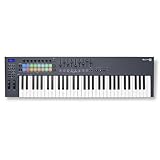
4. Novation FLkey 61 is the best keyboard for dedicated FL Studio production
Novation FLkey 61 USB MIDI Controller Keyboard
61 full-size keys
16 RGB pads
9 faders and 8 knobs
FL Studio integration
Pros
- Direct FL Studio control
- 61 full-size keys
- Chord and Scale modes
- Step sequencing
Cons
- Listed for Windows
- Large desk footprint
The Novation FLkey 61 is the clear specialist choice for an FL Studio-centered room. It pairs 61 full-size keys with 16 RGB pads, nine faders, and eight knobs, then maps them to FL Studio’s mixer and Channel Rack rather than asking the producer to build a generic template first.
I would choose it when playing and arranging deserve equal attention. The longer keybed makes it easier to voice chords and melodies across registers, while Sequencer Mode, transport controls, score-log functions, and pad access to FPC and SliceX keep FL Studio functions close at hand.
The direct FL Studio mapping reduces setup friction
Hardware mixer control and Channel Rack integration are the reason to buy this model rather than a more general 61-key controller. Scale mode helps keep notes in a selected scale, and the three chord modes can make harmony sketches much faster.
The 61-key format works best at a permanent workstation
At 37.48 inches wide and 7.6 pounds, this is a controller for a stable desk or keyboard stand rather than an everyday bag. That footprint pays back when a track needs lower bass notes and higher chord voicings at the same time.
5. Akai Professional MPK Mini Plus is the best compact controller for hardware gear
Akai Professional MPK Mini Plus 37-Key USB MIDI Keyboard…
37 mini keys
8 MPC pads
64-step sequencer
MIDI and CV/Gate I/O
Pros
- CV/Gate connectivity
- Three-octave keybed
- 64-step sequencer
- Responsive MPC pads
Cons
- One-year warranty
- Mini keys rather than full-size keys
The MPK Mini Plus fills a useful gap between a tiny laptop controller and a full desktop keyboard. Its 37-key MPK Mini keybed gives three octaves, while its MIDI and CV/Gate I/O let it reach hardware synths and modular gear that USB-only controllers cannot directly address.
The integrated 64-step sequencer has one drum track and one melody or chord track, so I would look here for a producer building patterns away from the computer as well as inside a DAW. It also keeps Akai’s eight RGB MPC pads, eight assignable knobs, transport controls, chord and scale modes, and NKS integration.
The CV and Gate connections matter for a hybrid setup
CV/Gate is the feature that separates this controller from most compact alternatives in this guide. A producer with compatible analog or modular instruments can send pitch and gate information without adding a separate conversion box.
The extra octave makes composition less cramped
Thirty-seven keys are still mini keys, but the third octave reduces the constant octave switching found on 25-key boards. That makes this a more comfortable portable option for bass, chords, and melodies while retaining a 2.87-pound carry weight.
6. Arturia KeyLab Essential 49 mk3 is the best controller for sound-library exploration
Arturia KeyLab Essential mk3 — 49 Key USB MIDI Keyboard…
49 keys with aftertouch
9 faders and encoders
8 RGB pads
Analog Lab V
Pros
- Aftertouch-capable keys
- 2000 Analog Lab V presets
- Nine faders and encoders
- Custom DAW integration
Cons
- Listed primarily for PC
- 49 keys can limit large arrangements
The KeyLab Essential 49 mk3 is a sensible fit for producers whose ideas begin by auditioning sounds. It brings 49 velocity-sensitive keys with aftertouch, nine encoders, nine faders, eight velocity- and pressure-sensitive RGB pads, and a 2.5-inch LCD screen to a controller built around both performance and preset browsing.
The included Analog Lab V collection lists 2,000 presets along with UVI Model D and NI The Gentleman pianos. That is a material advantage for a newcomer who needs a broad instrument starting point, while its custom DAW integration covers Ableton Live, Logic Pro X, FL Studio, Cubase, and Bitwig Studio.
The included instruments help a new producer build a usable palette
Software bundles matter when a controller is the beginning of a setup rather than an addition to a mature plug-in folder. The listed synth, hybrid, orchestral, and vintage-style content gives the keyboard an immediate role in writing rather than just sending MIDI data.
The aftertouch and screen add expression and feedback
Aftertouch lets a held note transmit further pressure information when a compatible instrument supports it, which can shape timbre or other parameters. The LCD can reduce guesswork when adjusting controls, a welcome detail in a layout with many assignable elements.
7. Akai Professional APC Key 25 MK2 is the best controller for Ableton clip launching
Akai Professional APC Key 25 MK2 25-Key USB MIDI Keyboard…
25 mini keys
40 RGB clip pads
8 rotary knobs
Ableton Live mapping
Pros
- 40-pad clip matrix
- Ableton Live Lite included
- Compact USB power
- Eight assignable knobs
Cons
- Made mainly for Ableton
- Only 25 mini keys
The APC Key 25 MK2 is built around Ableton Live’s Session View rather than around a conventional keyboard-control layout. Its 5-by-8 pad matrix supplies 40 RGB pads for launching clips with visual feedback, and its four directional buttons navigate tracks and scenes from the controller.
I would pick it for a producer or performer who works in clips, scenes, loops, and automation every day. The 25 velocity-sensitive mini keys and eight knobs handle notes and parameter changes, but the appeal is the pre-mapped Ableton operation and the direct way it turns Session View into an instrument.
The 40-pad matrix makes clips visible and playable
RGB feedback helps distinguish clips and scene states while the physical grid makes launching less abstract than clicking a laptop. This matters most for live performance and loop-based writing, where timing and navigation need to happen together.
The keyboard range suits Ableton control more than piano performance
Two octaves are sufficient for entering basses, hooks, and MIDI parts, but not the reason to choose this product. Producers who rely on large two-handed performances should pair it with a larger keyboard or choose a different main controller.
8. KORG Keystage 49 is the best controller for expressive MIDI 2.0 performance
Korg Keystage 49 MIDI-Controller with Polyphonic Aftertouch
49 semi-weighted keys
Polyphonic aftertouch and MPE
MIDI 2.0
Built-in audio interface
Pros
- Polyphonic aftertouch
- MPE support
- MIDI 2.0 Property Exchange
- OLED parameter screens
Cons
- Small review sample
- One-year warranty
The KORG Keystage 49 is the forward-looking option for a producer who values expressive playing as much as standard MIDI control. Its 49-key semi-weighted keybed supports polyphonic and channel aftertouch as well as MPE, meaning compatible instruments can respond to per-note pressure and other detailed gestures.
It is also the only product in this group explicitly listed with MIDI 2.0 Property Exchange, plus dedicated OLED parameter screens and a built-in audio interface with direct stereo output. I would reserve it for a producer who can put those features to work, rather than someone who only needs a basic note and pad controller.
The expression tools reward compatible instruments and careful playing
Polyphonic aftertouch differs from channel aftertouch because pressure can be sent individually for each held note, not merely across the entire keyboard channel. MPE expands the potential further, although the DAW and virtual instrument must support the expression data for it to matter.
The audio interface and screens support a performance-centered rig
Direct stereo output and parameter-specific OLED displays can make a live or hybrid setup more self-contained. Official Ableton Live integration, chord modes, and an arpeggiator keep it practical for production too, but its strongest case is nuanced performance control.
9. Native Instruments Komplete Kontrol S49 MK3 is the best controller for NKS software users
Native Instruments S-Series Komplete Kontrol S49 MK…
49 Fatar semi-weighted keys
Polyphonic aftertouch
NKS integration
Full-color display
Pros
- Fatar keybed
- Polyphonic aftertouch
- NKS software control
- Metal and glass construction
Cons
- Listed for PC
- One-year warranty
The Komplete Kontrol S49 MK3 is the focused choice for a producer already invested in Native Instruments instruments and NKS-compatible software. Its 49 semi-weighted Fatar keys, polyphonic aftertouch, high-resolution color display, USB-C connection, and NKS technology aim to keep sound browsing and parameter feedback close to the keys.
Its metal and glass construction separates it physically from plastic compact controllers, and the keybed is a meaningful draw for players who care about response. The record lists support for Ableton Live, Avid Pro Tools, and FL Studio, but the core reason to choose it remains its deep Native Instruments environment.
The NKS workflow makes sound selection less screen-bound
NKS technology is intended to connect compatible software instruments to controller browsing and controls. For someone who spends sessions inside Kontakt and related instruments, that integration can make choosing and shaping a sound feel more like working at hardware.
The Fatar keybed makes this a playing-first premium option
The 49-key semi-weighted keybed is for producers who regularly perform parts instead of drawing every note. At 7.32 kilograms, it is a substantial controller for a permanent setup, and its listed one-year warranty is worth considering against longer coverage elsewhere.
10. Arturia MicroLab Mk3 is the best stripped-back travel keyboard
Arturia MicroLab Mk3 Universal MIDI Controller, White
25 slim keys
USB-C powered
Pitch and mod touch strips
Sustain input
Pros
- Very light body
- MiniLab 3 keybed
- USB-C power
- Sustain pedal input
Cons
- No pads or knobs
- Only 25 keys
The Arturia MicroLab Mk3 is for the producer who wants keys first and minimal clutter second. It has 25 velocity-sensitive slim keys, USB-C power, pitch and modulation touch strips, a sustain pedal input, and a listed weight of 0.62 kilograms, making it one of the simplest ways to add playable notes to a laptop setup.
It uses the same high-quality slim keybed listed for the MiniLab 3, and it includes Analog Lab Intro plus Ableton Live Lite. I would choose it when the goal is writing melodic parts on the move, not when pads, faders, and detailed DAW navigation are expected from the controller itself.
The low weight makes this a realistic everyday carry option
A 1.37-pound controller is easier to keep beside a laptop, take to a writing session, or store when the desk is shared. USB-C power means one connection can handle the basic computer link without a separate power supply.
The sustain input helps piano-style ideas feel more natural
A sustain pedal input is a useful inclusion on such a stripped-down keyboard because it supports legato playing and held chord textures. The tradeoff is intentional: there are no drum pads or banks of knobs, so beatmakers should look toward the MiniLab 3 or MPK Mini IV.
11. RockJam RJMK25 is the best wireless option for casual mobile practice
RockJam RJMK25 25 Key USB MIDI Keyboard Controller with Drum…
25 mini keys
8 backlit pads
Bluetooth and USB
Rechargeable battery
Pros
- Rechargeable battery
- Bluetooth connectivity
- Wide DAW compatibility
- Headphone jack
Cons
- Budget-oriented construction
- Only 25 keys
The RockJam RJMK25 stands apart because it combines a rechargeable battery, Bluetooth connectivity, USB MIDI, and a 3.5 mm headphone jack in a 25-key controller. Those details make it a practical candidate for casual writing, private practice, and mobile use where cable-free operation matters as much as deep DAW mapping.
It has eight backlit drum pads with MPC-style note repeat and eight assignable knobs, plus stated compatibility with Ableton Live, FL Studio, Logic Pro, Cubase, Pro Tools, Reason, and Bitwig Studio. Its 4.4 rating comes from more than 27,000 reviews, a far larger feedback pool than several more specialized options here.
The battery and Bluetooth change where a producer can work
Most MIDI keyboard controllers expect a USB connection and computer power, while this one can operate with its rechargeable battery and Bluetooth option. That is convenient for sketching ideas away from a fixed desk, although a wired connection is still a sensible choice when stable DAW work is the priority.
The broad compatibility makes this a flexible starting controller
Its listed DAW support is wide, which gives a beginner room to try different music software before committing to a DAW-specific keyboard. The tradeoff is more modest build quality than premium controllers and a 25-key range that will eventually feel restrictive for some players.
12. Donner DMK 25 Pro is the best mini controller for guided learning
Donner USB-C MIDI Keyboard Controller, 25 Key Portable Mini…
25 mini keys
8 touch pads
16 smart scales
OLED display
Pros
- Sixteen smart scales
- Arpeggio and chord functions
- Mobile compatibility
- Teaching courses included
Cons
- Controller needs a DAW for sound
- Rating is lower than top picks
The Donner DMK 25 Pro is aimed at a producer who wants creative guidance built into a small controller. It includes 25 mini keys, eight touch-sensitive pads, an OLED display, 16 Smart Scales, arpeggio, note repeat, chord functions, a pitch and modulation touch bar, and 40 teaching courses alongside four DAW software options.
I would see it as a structured first step for someone who wants help finding notes and building basic patterns. It works with PC and mobile devices and lists support for Cubase LE, Live, Logic Pro, Pro Tools, and Studio One, though its 4.0 rating from 309 reviews means the stronger-rated compact models deserve comparison too.
The smart scale tools can shorten the path from idea to pattern
Sixteen Smart Scales are intended to help with bass lines, melodies, and leads by keeping note choices organized around a selected scale. They are useful training wheels for a beginner, but producers should still learn why the notes work rather than treating a mode as an automatic songwriting system.
The mobile support gives this controller a wider learning role
Compatibility with computers, phones, and tablets gives the DMK 25 Pro more setup flexibility than a controller tied only to a desktop workflow. Remember that it sends MIDI information and does not create sound on its own, so a compatible app, DAW, or instrument remains necessary.
The right MIDI keyboard depends on keys, DAW control, and connections
The fastest way to choose is to identify the job your hands need to do. A compact MIDI pad controller makes sense for finger drumming and laptop beats; a 49- or 61-key production keyboard makes more sense when you play chord progressions and melodies with both hands.
Key count should match the parts you play most often
Choose 25 keys for a very small desk, travel, drum programming, bass, and short lead lines. Choose 37 keys when a portable controller needs more melodic room, 49 keys for the most balanced studio range, and 61 keys when full chord voicings and wider arrangements are routine.
Forum discussions repeatedly point to 61 keys as a sweet spot for many producers, but that does not make it mandatory. Plenty of people make complete tracks with 25 keys by using octave buttons and drawing edits in the piano roll; the question is whether that extra switching interrupts your flow.
DAW integration should fit the software you open every day
Dedicated integration can save setup time. The FLkey 61 is the direct choice for FL Studio mixer and Channel Rack control, while the APC Key 25 MK2 is built around Ableton clip launching and the Keystage 49 lists official Ableton Live integration.
For a mixed DAW setup, the Launchkey 49 MK4 lists support across many major programs, and the KeyLab Essential 49 mk3 names Ableton Live, Logic Pro X, FL Studio, Cubase, and Bitwig Studio. Before committing, check that the version of your own DAW and operating system matches the controller’s stated support.
Pads, faders, and knobs decide how much mouse work remains
Producers who make drums should prioritize responsive velocity-sensitive pads, such as the MPC pads on the Akai models or the 16 pads on the Launchkey 49 MK4. Pads also suit clips, samples, and chord triggers, which is why a grid controller can be more useful than extra keys in an Ableton-based set.
Faders are especially helpful for mixer levels and automation, while endless encoders are good for plug-in parameters and browsing. Nine faders on the Launchkey 49 MK4, FLkey 61, and KeyLab Essential 49 mk3 offer more mixer-ready control than the compact 25-key options.
Key action and expression determine how played parts feel
Mini keys save space but feel different from full-size keys, a tradeoff that comes up often in producer discussions. Semi-weighted keys on the Launchkey, Keystage, and S49 are closer to a conventional keyboard experience, while weighted or hammer-action action is more relevant for pianists and is not represented by these twelve controllers.
Aftertouch adds another control layer after a note is held. The KeyLab Essential has aftertouch, and the KORG Keystage 49 and Native Instruments S49 MK3 offer polyphonic aftertouch; that greater detail only pays off with instruments that respond to it.
Connections should match both computer and external hardware
USB-C is common here and is enough for a standard computer-and-DAW setup. Full-size MIDI Out on the MPK Mini IV and MIDI out on the MiniLab 3 are helpful when external synths enter the picture, while the MPK Mini Plus goes further with MIDI and CV/Gate I/O for compatible modular and analog gear.
MIDI 2.0 is not necessary for most beginners, but the Keystage 49’s listed MIDI 2.0 Property Exchange is a meaningful future-facing feature for compatible equipment. If low latency matters for live performance, use the controller with a stable USB connection and configure the audio buffer in the DAW; MIDI data is only one part of a responsive system.
Software, warranty, and long-term fit matter after the first session
Bundled software can turn a controller into a usable first production package. Arturia includes Analog Lab content with its MiniLab, MicroLab, and KeyLab models; Akai includes software and sound collections with several models; Novation includes Ableton Live Lite on relevant models and a stated FL Studio trial with the FLkey 61.
Warranty coverage varies in the supplied records, from one year on several products to three years on the Novation models, two years on the KeyLab Essential and RockJam, and five years on the MiniLab 3. A controller that supports a producer’s next stage is less likely to become unused hardware, which is also the more sensible way to limit unnecessary electronic waste.
A simple setup path gets a new controller making music quickly
First, connect the controller by USB-C or USB and install any manufacturer software or drivers that the product requires. Then select it as a MIDI input in the DAW, load a software instrument, play a few notes, and confirm that velocity reaches the track.
Next, test pads, transport buttons, and one knob or fader, then save the correct DAW template if the controller provides one. Start with a small part such as a drum loop, bass line, or four-chord progression, because learning a few controls in an actual track is more productive than mapping every function at once.
FAQs
What MIDI keyboards do producers use?
Producers use everything from 25-key pad controllers to 49- and 61-key keyboards. Compact models such as the Arturia MiniLab 3 and Akai MPK Mini IV suit beats and travel, while the Novation Launchkey 49 MK4 suits broad DAW work, the FLkey 61 suits FL Studio, and the APC Key 25 MK2 suits Ableton clip launching.
Who makes the best MIDI keyboards?
Novation, Arturia, Akai Professional, KORG, and Native Instruments all make strong MIDI keyboards, but each has a different strength. Novation offers DAW-focused options, Arturia pairs controllers with large sound bundles, Akai emphasizes MPC pads and compact production tools, KORG focuses on advanced expression, and Native Instruments centers on NKS integration.
What is the best keyboard for producing music?
The Novation Launchkey 49 MK4 is the best all-round choice in this list because it combines 49 semi-weighted keys, 16 pads with polyphonic aftertouch, nine faders, eight encoders, and stated support for major DAWs. The best choice changes if FL Studio, Ableton clips, modular gear, or mobile production is your main priority.
Which MIDI keyboard works best for composing songs in Logic?
For Logic-based composition, the Novation Launchkey 49 MK4 and Arturia KeyLab Essential 49 mk3 are strong candidates because both list Logic compatibility and give 49 keys for chords, bass, and melody writing. The Akai MPK Mini IV also lists Logic Pro mapping when a small, pad-oriented controller is the better fit.
The best MIDI keyboard for you is the one that matches your workflow
For most producers, the Novation Launchkey 49 MK4 is the most complete blend of keys, pads, faders, expression, and stated multi-DAW support. Choose the FLkey 61 if FL Studio is home, the APC Key 25 MK2 if Ableton clips drive the work, the MPK Mini Plus for external hardware, or the Keystage 49 and S49 MK3 when expressive playing and advanced software control lead the decision.
The best MIDI keyboards for producers in 2026 are not automatically the largest or most feature-packed units. Pick the one that will stay connected, keep your hands on the music, and make the next eight-bar idea easier to finish.
